todo.txt open standard · Open source · MIT

todo.txt app for Android.
No cloud. No accounts.

don3txt is a free, open source task manager for Android based on the todo.txt open standard. Plain text, 100% local, no external dependencies. Your data is yours.

MIT
Free license
0
Servers
100%
Local

Everything you need,
nothing you don't

Clean interface built with Material Design 3

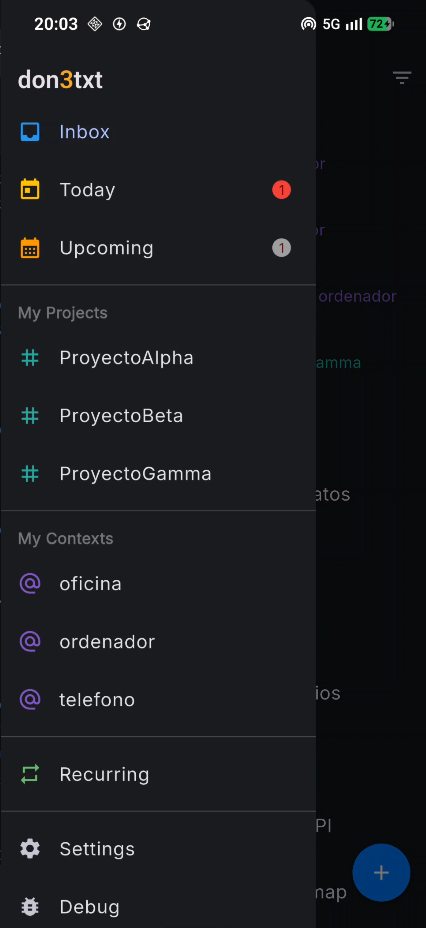
Sidebar with views: Inbox, Today, Upcoming, projects and contexts

Navigation

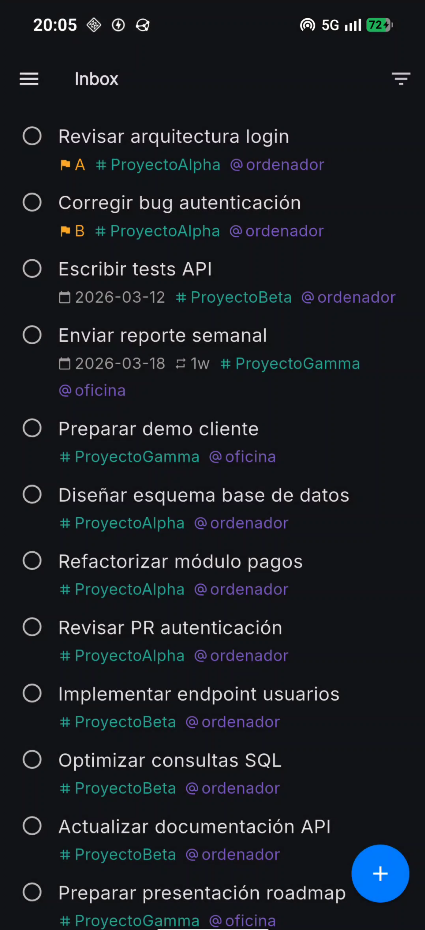
Inbox view with task list, priorities, projects and contexts

Inbox

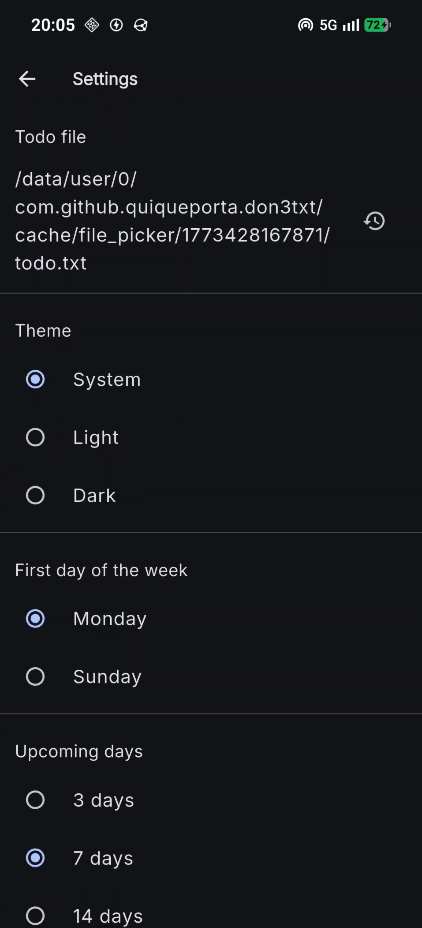
Settings screen: todo.txt file, theme, first day of week, upcoming days

Settings

Powerful inside,
simple outside

Everything a serious productivity system needs

📋

Standard todo.txt format

Full compatibility with the open standard. Priorities (A)-(Z), projects +name, contexts @name and metadata key:value. Complete or delete tasks with Undo support. Completed tasks are archived to done.txt.

🔄

Recurring tasks

Flexible recurrence with rec:1m (from completion) or strict with rec:+1m (from original date). Supports days, weeks, months and years.

🕐

Threshold date

With t:2024-02-25 the task stays hidden from action views until its time comes. Still visible in Upcoming and Recurring before the threshold date.

📅

Due dates

Add due:YYYY-MM-DD with the built-in calendar picker. Overdue tasks are visually highlighted in the Today view.

🏷

Visual tag pickers

Tap + or @ in the editor to browse existing projects and contexts as selectable chips. Create new tags on the fly. Works alongside manual typing without duplicates.

📁

Choose your file

Pick any todo.txt from your device. Compatible with Syncthing, Dropbox or any folder-sync service for cross-device sync. Pull-to-refresh to reload changes from disk.

🌓

Light, dark and system theme

Three theme options applied instantly. System mode follows your Android configuration automatically.

Fully configurable

First day of the week (Monday or Sunday), Upcoming period (3, 7, 14 or 30 days) and file path. All from Settings.

🔒

No external dependencies

No internet required. No account needed. No server. Your tasks live exclusively on your device, in plain text.

Plain text.
Forever.

The todo.txt format is an open, human-readable standard. No proprietary databases, no complicated exports, no vendor lock-in.

A text file you can open with any editor, move between devices, version with git, sync with Syncthing, Dropbox or any cloud folder, or even edit by hand.

Your tasks will be available on any platform that supports the standard, now and ten years from now.

todo.txt
(A) Call the dentist @phone
(B) 2024-01-15 Review PR +Project @office
(C) Prepare presentation due:2024-02-10
Buy milk @supermarket
Pay rent due:2024-02-01 rec:1m
Review report due:2024-03-01 t:2024-02-25 rec:+1m
x 2024-01-16 2024-01-15 Send contract +Work

Why don3txt

01

Privacy by design

No server receives your tasks. No account to create. No telemetry. Your data never leaves your device unless you choose so.

02

Full interoperability

The todo.txt format has dozens of implementations on iOS, macOS, Linux and Windows. Switch apps whenever you want. Your file always works.

03

Free software

Open source under the MIT license. You can read it, modify it, contribute or fork it. No restrictions, no surprises.

Frequently asked questions

Everything you need to know about don3txt and the todo.txt format

What is todo.txt?

todo.txt is an open, human-readable plain text format for managing tasks, created by Gina Trapani. A single text file holds all your tasks with a simple syntax for priorities, projects, contexts and metadata. Because it is plain text, you can read, edit and sync it with any tool and on any platform, with no vendor lock-in.

Is don3txt free?

Yes. don3txt is completely free and open source under the MIT license. There are no premium features, no subscriptions, no ads and no in-app purchases.

Does don3txt work offline?

Yes. don3txt works 100% offline. It does not require an internet connection, an account or a server. Your todo.txt file lives exclusively on your device unless you choose to sync it yourself.

How do I sync my tasks across devices?

don3txt does not include built-in sync, by design. You can sync your todo.txt file using any folder-sync service such as Syncthing, Dropbox, Google Drive or Nextcloud. Just point don3txt to the synced file and pull-to-refresh to reload changes.

Is don3txt compatible with other todo.txt apps?

Yes. don3txt follows the official todo.txt specification, so your file is fully compatible with any other todo.txt application on iOS, macOS, Linux, Windows or the web. You can switch apps at any time without losing data.

Where can I download the don3txt APK?

The latest don3txt APK is published on GitHub Releases. Download the APK and install it directly on your Android device.

Get started today

Download the APK, pick your todo.txt file and start managing your tasks with no strings attached.

Current version: v1.9.1